Netty TCP 粘包和拆包 及解决方案

2021-03-12 23:31

阅读:540

标签:连接   netty   final   cal   imp   opened   return   hand   bec   

1 TCP 粘包和拆包基本介绍

1) TCP 是面向连接的, 面向流的, 提供高可靠性服务。 收发两端(客户端和服务器端) 都要有一一成对的 socket,因此, 发送端为了将多个发给接收端的包, 更有效的发给对方, 使用了优化方法(Nagle 算法) , 将多次间隔较小且数据量小的数据, 合并成一个大的数据块, 然后进行封包。 这样做虽然提高了效率, 但是接收端就难于分辨出完整的数据包了, 因为面向流的通信是无消息保护边界的。
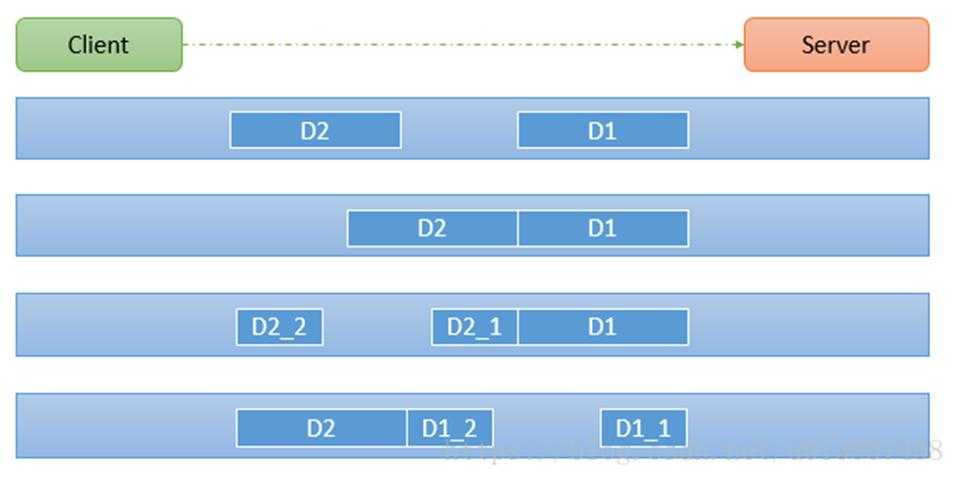
2) 由于 TCP 无消息保护边界, 需要在接收端处理消息边界问题, 也就是我们所说的粘包、 拆包问题, 看一张图
3) 示意图 TCP 粘包、 拆包图解
技术图片

 对图的说明:

 假设客户端分别发送了两个数据包 D1 和 D2 给服务端, 由于服务端一次读取到字节数是不确定的, 故可能存在以
下四种情况:
    1) 服务端分两次读取到了两个独立的数据包, 分别是 D1 和 D2, 没有粘包和拆包
    2) 服务端一次接受到了两个数据包, D1 和 D2 粘合在一起, 称之为 TCP 粘包
    3) 服务端分两次读取到了数据包, 第一次读取到了完整的 D1 包和 D2 包的部分内容, 第二次读取到了 D2 包 的剩余内容, 这称之为 TCP 拆包 

    4) 服务端分两次读取到了数据包, 第一次读取到了 D1 包的部分内容 D1_1, 第二次读取到了 D1 包的剩余部

       分内容 D1_2 和完整的 D2 包。


2 TCP 粘包和拆包现象实例 (现象)

在编写 Netty 程序时, 如果没有做处理, 就会发生粘包和拆包的问题
看一个具体的实例:
MyClientHandler

技术图片技术图片
import io.netty.buffer.ByteBuf;
import io.netty.buffer.Unpooled;
import io.netty.channel.ChannelHandlerContext;
import io.netty.channel.SimpleChannelInboundHandler;
import java.nio.charset.Charset;
public class MyClientHandler extends SimpleChannelInboundHandler {
private int count;
@Override
public void channelActive(ChannelHandlerContext ctx) throws Exception {
//使用客户端发送 10 条数据 hello,server 编号
for(int i= 0; ii) {
ByteBuf buffer = Unpooled.copiedBuffer("hello,server " + i, Charset.forName("utf-8"));
ctx.writeAndFlush(buffer);
}
}
@Override
protected void channelRead0(ChannelHandlerContext ctx, ByteBuf msg) throws Exception {
byte[] buffer = new byte[msg.readableBytes()];
msg.readBytes(buffer);
String message = new String(buffer, Charset.forName("utf-8"));
System.out.println("客户端接收到消息=" + message);
System.out.println("客户端接收消息数量=" + (++this.count));
} 
@Override
public void exceptionCaught(ChannelHandlerContext ctx, Throwable cause) throws Exception {
cause.printStackTrace();
ctx.close();
}
}
View Code
MyServerHandler
技术图片技术图片
import io.netty.buffer.ByteBuf;
import io.netty.buffer.Unpooled;
import io.netty.channel.ChannelHandlerContext;
import io.netty.channel.SimpleChannelInboundHandler;
import java.nio.charset.Charset;
import java.util.UUID;
public class MyServerHandler extends SimpleChannelInboundHandler{
private int count;
@Override
public void exceptionCaught(ChannelHandlerContext ctx, Throwable cause) throws Exception {
//cause.printStackTrace();
ctx.close();
}
@Override
protected void channelRead0(ChannelHandlerContext ctx, ByteBuf msg) throws Exception {
byte[] buffer = new byte[msg.readableBytes()];
msg.readBytes(buffer);
//将 buffer 转成字符串
String message = new String(buffer, Charset.forName("utf-8"));
System.out.println("服务器接收到数据 " + message);
System.out.println("服务器接收到消息量=" + (++this.count));
//服务器回送数据给客户端, 回送一个随机 id ,
ByteBuf responseByteBuf = Unpooled.copiedBuffer(UUID.randomUUID().toString() + " ",
Charset.forName("utf-8"));
ctx.writeAndFlush(responseByteBuf);
}
}
View Code

3 TCP 粘包和拆包解决方案

1) 使用自定义协议 + 编解码器 来解决
2) 关键就是要解决 服务器端每次读取数据长度的问题, 这个问题解决, 就不会出现服务器多读或少读数据的问
题, 从而避免的 TCP 粘包、 拆包 。 
实列:

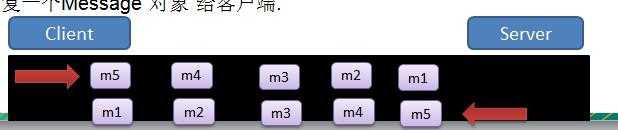
1) 要求客户端发送 5 个 Message 对象, 客户端每次发送一个 Message 对象
2) 服务器端每次接收一个 Message, 分 5 次进行解码, 每读取到 一个 Message , 会回复一个 Message 对象 给客
户端.
技术图片


 MessageProtocol //协议包

技术图片技术图片
public class MessageProtocol {
private int len; //关键
private byte[] content;
public int getLen() {
return len;
}
public void setLen(int len) {
this.len = len;
} p
ublic byte[] getContent() {
return content;
} p
ublic void setContent(byte[] content) {
this.content = content;
}
}
View Code

 MyClientHandler

技术图片技术图片
import io.netty.buffer.ByteBuf;
import io.netty.buffer.Unpooled;
import io.netty.channel.ChannelHandlerContext;
import io.netty.channel.SimpleChannelInboundHandler;

import java.nio.charset.Charset;

public class MyClientHandler extends SimpleChannelInboundHandler {

    private int count;
    @Override
    public void channelActive(ChannelHandlerContext ctx) throws Exception {
        //使用客户端发送10条数据 "今天天气冷,吃火锅" 编号

        for(int i = 0; i) {
            String mes = "今天天气冷,吃火锅";
            byte[] content = mes.getBytes(Charset.forName("utf-8"));
            int length = mes.getBytes(Charset.forName("utf-8")).length;

            //创建协议包对象
            MessageProtocol messageProtocol = new MessageProtocol();
            messageProtocol.setLen(length);
            messageProtocol.setContent(content);
            ctx.writeAndFlush(messageProtocol);

        }

    }

//    @Override
    protected void channelRead0(ChannelHandlerContext ctx, MessageProtocol msg) throws Exception {

        int len = msg.getLen();
        byte[] content = msg.getContent();

        System.out.println("客户端接收到消息如下");
        System.out.println("长度=" + len);
        System.out.println("内容=" + new String(content, Charset.forName("utf-8")));

        System.out.println("客户端接收消息数量=" + (++this.count));

    }

    @Override
    public void exceptionCaught(ChannelHandlerContext ctx, Throwable cause) throws Exception {
        System.out.println("异常消息=" + cause.getMessage());
        ctx.close();
    }
}
View Code
MyClient
技术图片技术图片
import io.netty.bootstrap.Bootstrap;
import io.netty.channel.ChannelFuture;
import io.netty.channel.EventLoopGroup;
import io.netty.channel.nio.NioEventLoopGroup;
import io.netty.channel.socket.nio.NioSocketChannel;

public class MyClient {
    public static void main(String[] args)  throws  Exception{

        EventLoopGroup group = new NioEventLoopGroup();

        try {

            Bootstrap bootstrap = new Bootstrap();
            bootstrap.group(group).channel(NioSocketChannel.class)
                    .handler(new MyClientInitializer()); //自定义一个初始化类

            ChannelFuture channelFuture = bootstrap.connect("localhost", 7000).sync();

            channelFuture.channel().closeFuture().sync();

        }finally {
            group.shutdownGracefully();
        }
    }
}
View Code
MyClientInitializer
技术图片技术图片
import io.netty.channel.ChannelInitializer;
import io.netty.channel.ChannelPipeline;
import io.netty.channel.socket.SocketChannel;


public class MyClientInitializer extends ChannelInitializer {
    @Override
    protected void initChannel(SocketChannel ch) throws Exception {

        ChannelPipeline pipeline = ch.pipeline();
        pipeline.addLast(new MyMessageEncoder()); //加入编码器
        pipeline.addLast(new MyMessageDecoder()); //加入解码器
        pipeline.addLast(new MyClientHandler());
    }
}
View Code
MyServer
技术图片技术图片
import io.netty.bootstrap.ServerBootstrap;
import io.netty.channel.ChannelFuture;
import io.netty.channel.EventLoopGroup;
import io.netty.channel.nio.NioEventLoopGroup;
import io.netty.channel.socket.nio.NioServerSocketChannel;

public class MyServer {
    public static void main(String[] args) throws Exception{

        EventLoopGroup bossGroup = new NioEventLoopGroup(1);
        EventLoopGroup workerGroup = new NioEventLoopGroup();

        try {

            ServerBootstrap serverBootstrap = new ServerBootstrap();
            serverBootstrap.group(bossGroup,workerGroup).channel(NioServerSocketChannel.class)
                    .childHandler(new MyServerInitializer()); //自定义一个初始化类


            ChannelFuture channelFuture = serverBootstrap.bind(9994).sync();
            channelFuture.channel().closeFuture().sync();

        }finally {
            bossGroup.shutdownGracefully();
            workerGroup.shutdownGracefully();
        }

    }
}
View Code
MyServerInitializer
技术图片技术图片
import io.netty.channel.ChannelInitializer;
import io.netty.channel.ChannelPipeline;
import io.netty.channel.socket.SocketChannel;


public class MyServerInitializer extends ChannelInitializer {

    @Override
    protected void initChannel(SocketChannel ch) throws Exception {
        ChannelPipeline pipeline = ch.pipeline();

        pipeline.addLast(new MyMessageDecoder());//解码器
        pipeline.addLast(new MyMessageEncoder());//编码器
        pipeline.addLast(new MyServerHandler());
    }
}
View Code
MyServerHandler
技术图片技术图片
import io.netty.buffer.ByteBuf;
import io.netty.buffer.Unpooled;
import io.netty.channel.ChannelHandlerContext;
import io.netty.channel.SimpleChannelInboundHandler;

import java.nio.charset.Charset;
import java.util.UUID;


//处理业务的handler
public class MyServerHandler extends SimpleChannelInboundHandler{
    private int count;

    @Override
    public void exceptionCaught(ChannelHandlerContext ctx, Throwable cause) throws Exception {
        //cause.printStackTrace();
        ctx.close();
    }

    @Override
    protected void channelRead0(ChannelHandlerContext ctx, MessageProtocol msg) throws Exception {

        //接收到数据,并处理
        int len = msg.getLen();
        byte[] content = msg.getContent();

        System.out.println();
        System.out.println();
        System.out.println();
        System.out.println("服务器接收到信息如下");
        System.out.println("长度=" + len);
        System.out.println("内容=" + new String(content, Charset.forName("utf-8")));

        System.out.println("服务器接收到消息包数量=" + (++this.count));

        //回复消息

//        String responseContent = UUID.randomUUID().toString();
//        int responseLen = responseContent.getBytes("utf-8").length;
//        byte[]  responseContent2 = responseContent.getBytes("utf-8");
        //构建一个协议包
//        MessageProtocol messageProtocol = new MessageProtocol();
//        messageProtocol.setLen(responseLen);
//        messageProtocol.setContent(responseContent2);
//
//        ctx.writeAndFlush(messageProtocol);


    }
}
View Code
MyMessageDecoder
技术图片技术图片
import io.netty.buffer.ByteBuf;
import io.netty.channel.ChannelHandlerContext;
import io.netty.handler.codec.ReplayingDecoder;

import java.util.List;

public class MyMessageDecoder extends ReplayingDecoder {
    @Override
    protected void decode(ChannelHandlerContext ctx, ByteBuf in, List out) throws Exception {
        System.out.println("MyMessageDecoder decode 被调用");
        //需要将得到二进制字节码-> MessageProtocol 数据包(对象)
        int length = in.readInt();

        byte[] content = new byte[length];
        in.readBytes(content);

        //封装成 MessageProtocol 对象,放入 out, 传递下一个handler业务处理
        MessageProtocol messageProtocol = new MessageProtocol();
        messageProtocol.setLen(length);
        messageProtocol.setContent(content);

        out.add(messageProtocol);

    }
}
View Code
MyMessageEncoder
技术图片技术图片
import io.netty.buffer.ByteBuf;
import io.netty.channel.ChannelHandlerContext;
import io.netty.handler.codec.MessageToByteEncoder;

public class MyMessageEncoder extends MessageToByteEncoder {
    @Override
    protected void encode(ChannelHandlerContext ctx, MessageProtocol msg, ByteBuf out) throws Exception {
        System.out.println("MyMessageEncoder encode 方法被调用");
        out.writeInt(msg.getLen());
        out.writeBytes(msg.getContent());
    }
}
View Code


Netty TCP 粘包和拆包 及解决方案

标签:连接   netty   final   cal   imp   opened   return   hand   bec   

原文地址:https://www.cnblogs.com/cb1186512739/p/12774583.html


评论


亲,登录后才可以留言!